
List of bugs and issues with C6F0SoZ3N0PdL2 IP CAM 5MP WIFI 5X Optical Zoom Human Tracking Detection IR Night Vision - Model: B8D-WIFI-5MP-5X

lucato

n3wb
Dec 3, 2020
29
5
Brazil
Hi folks here I'll share and keep updating the bugs/issues I've found by using the device Type C6F0SoZ3N0PdL2 I just purchased.
It is a 5MP 5X optical zoom PTZ IP WIFI camera with Human Detection IR Night Vision. I hope you share your camera issues also if you have also found some for the same model/device type. If so, share it here.
Also if you have the 256 preset list for this model or part of it, share the file in this thread too. If I find more issues or even the preset list, I'll keep updating this thread/post and I'll post here the preset I have found for it.

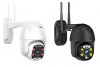
Here is the camera design body image white or black version to you identify it:
camera-body-black-and-white.jpg

So, here are some info about the camera:
| Seller: Nonwee;
| Device Type: C6F0SoZ3N0PdL2
| Firmware (Software version): V19.1.61.16.3-20210111
| Model: B8D-WIFI-5MP-5X
|Software/App used: HICam | HiCamPro | IP CAMERA (P2P Client v6.5.1.4) | Genius Vision | Webware Version: V3.0.7.1

PROBLEMS FOUND FOR A WHILE:
1. PRESET 1 - If I set preset 1, and when the camera comes back from any other preset with zoom, the PRESET 1 doesn't go back to the zoom position, so the ZOOM doesn't work at PRESET 1. Preset 2 and so on are ok for zooming in/out;
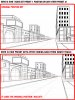
2. WHEN USING SMART TRACK (HUMANOID TRACKING) - It messes all preset positions I have set. So, for example, if I had set PRESET 2 for X,Y, Z position, after coming back from some smart tracking the PRESET 2 gets wrong as X, Y-4, Z. So every time I have to reprogram all 8 to 32 presets positions;
3, ANY PRESET EVEN WITHOUT HUMANOID TRACKING - If I set preset positions, and when the camera comes back from any other preset with very high/bottom vertical position, the PRESETS doesn't go back to the original position I had set, so it messes the original positions;
4. MISSING PRESET POSITION - If I set a preset for example on the right side at horizon position (preset 2) and goes all way down with the cursors (joystick buttons) and at the maximum very bottom call the preset 2 or you can move up again and call it, the preset 2 isn't in the correct position any longer.
Here is an image example for 2. and 3. :
preset-position-issue.jpg

Thanks
 
Last edited:
If you can, send this piece of shit back to the sender ...
The problem isn't to send back and solve it in an "easy way". The problem is it seems that all the cameras in the market that use humanoid tracking seem to have the same behavior issue messing presets after coming back from a smart track. So, if I buy another model, probably I'll face the same issue as the one I got from Marviosaver and returned (another model 5MP 30x Zoom and it has more and worst issues). So the main point is to help others, find info on the web before/after buying, and let developers know it and fix the issue in the programming/firmware and improve all pieces already sold providing firmware updates and improving the new launches. You pay more to have such a feature and need to work ok. The camera quality is good, image too. The main point is try to solve the issues.
 
you can not solve problems of these china cameras.

its simple... you pay a low price, get crappy hardware (maybe acceptable for someone) but you also get crappy firmware. there are no people who fix it, because you never find the "real" manufactur or the students who make the firmware. there are many chinese distributors who have catalogs full of these crap and you can buy them in huge lots with your own label on it. its nearly impossible to find someone who is responsible.

most of these chinese cameras work the same and have the same bugs, because they are all made from the same stolen firmware source, which is maybe older than you...

just think about it,... they already have your money, why should they care about bugs ? no one cares !! they just change the name of it, maybe the design and sell it again. all negative reputation is gone in a few minutes.

dont waste your time with these cameras. its a dead end !
 
  • Like
Reactions: SouthernYankee
The problem is it seems that all the cameras in the market that use humanoid tracking seem to have the same behavior issue messing presets after coming back from a smart track.

That is an inaccurate statement. For example, the Dahua and Hikvision PTZs with autotracking of human and vehicles works just fine.

Sometimes you do get what you pay for.
 
Hello,
I have C6F0SoZ3N0PdL2 IPCAM, with V19.1.11.16.3-20200911 FW version.
Can I upload V19.1.61.16.19?
As I read, the first three numbers from the FW version have to be the same.
 
after connecting the camera to the DVR, it constantly reboots. earlier, the camera could work with the registrar for several days
 

Attachments

  • Снимок.PNG
    Снимок.PNG
    192.6 KB · Views: 71
Hi folks here I'll share and keep updating the bugs/issues I've found by using the device Type C6F0SoZ3N0PdL2 I just purchased.
It is a 5MP 5X optical zoom PTZ IP WIFI camera with Human Detection IR Night Vision. I hope you share your camera issues also if you have also found some for the same model/device type. If so, share it here.
Also if you have the 256 preset list for this model or part of it, share the file in this thread too. If I find more issues or even the preset list, I'll keep updating this thread/post and I'll post here the preset I have found for it.

Here is the camera design body image white or black version to you identify it:
View attachment 94626

So, here are some info about the camera:
| Seller: Nonwee;
| Device Type: C6F0SoZ3N0PdL2
| Firmware (Software version): V19.1.61.16.3-20210111
| Model: B8D-WIFI-5MP-5X
|Software/App used: HICam | HiCamPro | IP CAMERA (P2P Client v6.5.1.4) | Genius Vision | Webware Version: V3.0.7.1

PROBLEMS FOUND FOR A WHILE:
1. PRESET 1 - If I set preset 1, and when the camera comes back from any other preset with zoom, the PRESET 1 doesn't go back to the zoom position, so the ZOOM doesn't work at PRESET 1. Preset 2 and so on are ok for zooming in/out;
2. WHEN USING SMART TRACK (HUMANOID TRACKING) - It messes all preset positions I have set. So, for example, if I had set PRESET 2 for X,Y, Z position, after coming back from some smart tracking the PRESET 2 gets wrong as X, Y-4, Z. So every time I have to reprogram all 8 to 32 presets positions;
3, ANY PRESET EVEN WITHOUT HUMANOID TRACKING - If I set preset positions, and when the camera comes back from any other preset with very high/bottom vertical position, the PRESETS doesn't go back to the original position I had set, so it messes the original positions;
4. MISSING PRESET POSITION - If I set a preset for example on the right side at horizon position (preset 2) and goes all way down with the cursors (joystick buttons) and at the maximum very bottom call the preset 2 or you can move up again and call it, the preset 2 isn't in the correct position any longer.
Here is an image example for 2. and 3. :
View attachment 94628

Thanks

This isn't a software fault, it's a hardware design woe that can't be corrected in software.

Like many robotic systems, these cameras use stepper motors inside. A microchip will send out pulses to turn the motor - as far as that chip and the software running it is concerned, 1 pulse forward will equal 1 pulse backwards to put it in the same position.

The problem occurs in that these devices have no real feedback for the micro processor to compare to it's output instructions. If you go all the way left and keep pressing, that chip will keep outputting pulses to the stepper motor but the camera won't turn any further because it's physically unable to. The processor however thinks it has gone further left than it actually has and so when it's counting it's pulses to turn it right, the camera head doesn't return to the same position. Here's an example:

You send the camera 30 left presses. Processor sends 30 left presses to the motor.. the trouble is, the motor can only go left 28 presses but the processor has no feed back that it stopped at 28 and so it thinks it moved 30. Now when you send the preset to the camera to go back to where it was, it's going to turn right 30 presses because that's what it counted. In the process, your camera head now turns two presses to the right of where it should be. As far as the processor is concerned, it's correct.

Incidentally I wouldn't rely on motion / humanoid tracking too much. You get two people in the same frame and the camera is gonna be forced to make a difficult choice.

It's cheap hardware. More expensive would do a better job but nothing is perfect and you'll no doubt find bugs in expensive setups too if you analyze it enough.

The only real way to correct this would be to actually go to china - Shenzen - and find who it is that's actually making the physical cameras and try to offer help from a westerners perspective - they may well be grateful. The chinese are good at making stuff but they don't always understand it particularly well. If I could do so myself, I'd head out there and try to get involved in these cameras myself - I'd love to modify the firmware and the IP CAMERA web interface so that both work properly but it's not going to happen. With that said, I've emailed Ctronics recently (another brand of these cameras) about the root password for telnet access and they have said if I can send them my camera details they'll ask the factory for further information. There is always the possibility I might be able to open a line of communication with them.. but I'm not going to get my hopes up.