Blue Iris 6 AI integration -> analysis triggered by motion

paxy455

n3wb
Apr 9, 2021
5
0
at
Hi everyone,

I’m one of the users who has been using AITool with Deepstack alongside Blue Iris 5 for a long time (workflow in brief: BI Motion Control triggers on motion and saves images to a folder -> AITool tracks this folder and initiates the Deepstack analysis -> positive result -> Blue Iris camera recording is triggered by AITool)

Now I’ve looked into Blue Iris 6 and am wondering if it would be possible to use Motion Control instead of a constant time variable to determine how often a camera should be analyzed (which is very computationally intensive with ~10 cameras!).

TLDR:
Would it be possible, when motion is detected via the Blue Iris Motion Control feature, to perform an AI analysis and generate an alert with a recording?

This would save a lot of AI CPU resources because the system wouldn’t be constantly analyzing.

If its not yet possible, this would be an awesome feature request.
 
as far as I understood that feature, it scans in intervals set by the user (scan every .... not more often than ....)
Mine is set to trigger on motion detection and then pass the trigger on to AI to see if it is an object that meets the AI criteria (car, person, bicycle, etc.), this is the usual way to do this as far as I know. Eliminates alerts from things I don't care about!, the trigger still occurs but is moved to the cancelled alert list. I believe that it can be set to do interval scanning but it does not have to be set that way, I think that is a recent feature that was added, no use to me at the moment!
 
As mentioned, BI has been doing that since Deepstack was introduced to BI.

AI Tools was a tool created before BI had any type of AI other than Sentry.

Once it added Deepstack Integration to BI, it pretty much eliminated the need for AI Tools except for the few use cases that provided even more granular stuffl.

And this followed thru when it went from Deepstack to CodeProject to now Built-In AI.

The scan at intervals is something that folks will turn on if they are getting false triggers of parked cars due to say differing headlight shine on them as the car goes by.

My fields of view that I am using BI AI does not have that situation, so it only sends to AI when the camera is actually triggered.
 
  • Like
Reactions: Bruce_H
Mine is set to trigger on motion detection and then pass the trigger on to AI to see if it is an object that meets the AI criteria (car, person, bicycle, etc.), this is the usual way to do this as far as I know. Eliminates alerts from things I don't care about!, the trigger still occurs but is moved to the cancelled alert list. I believe that it can be set to do interval scanning but it does not have to be set that way, I think that is a recent feature that was added, no use to me at the moment!

how did you configure this setup "trigger on motion detection -> pass the trigger to AI" -> where can I find this setting?
thank you
 
I can show you screen captures, but I am using BI Version 6.0.5.5 and if you are using V5 they will not be the same, I do not have any V5 still running as I updated all of my three systems to V6 quite some time ago!

Here is the link to the current help file, it contains screen shots and good descriptions of the settings on each page
You want to look at the camera setting, the AI tab (page 90) and the Motion/Trigger tab (page 60)
 
Last edited:
This is from the last BI version that used DeepStack before it went to CodeProject, so 5/22 or almost 4 years ago.

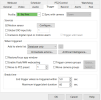
You go to the camera in question and go to the TRIGGER tab

1778241170295.png


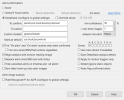
And after you set up your BI motion sensor, then go to the ARTIFICIAL INTELLEIGENCE button:

1778241245446.png

And if you don't want it periodically scanning when there isn't motion, check the "Apply to motion triggers only" and uncheck the "Detect/ignore static objects.

But this has been a feature going on at least 4 years, but if not 5 years, whenever Deepstack was added as an option under BI.
 

Attachments

  • 1778241147987.png
    1778241147987.png
    132.3 KB · Views: 5
Thank you everyone for contributing your settings!

I already upgraded to BI6 - and now I am struggling to enable it like I described above ( trigger on motion detection -> pass the trigger to AI - with no continuously scanning....)
Will try to adapt your recommendations to the settings...
 
Thank you everyone for contributing your settings!

I already upgraded to BI6 - and now I am struggling to enable it like I described above ( trigger on motion detection -> pass the trigger to AI - with no continuously scanning....)
Will try to adapt your recommendations to the settings...
Asking specific questions in my estimation are better than asking for help setting up everything, I think people are more inclined to provide help when they see that the person is actively trying to do it themself and has just gotten stuck on some specific issue! Just my two cents!:)
 
Thank you everyone for contributing your settings!

I already upgraded to BI6 - and now I am struggling to enable it like I described above ( trigger on motion detection -> pass the trigger to AI - with no continuously scanning....)
Will try to adapt your recommendations to the settings...
Have you spent time reading the BI help file? If not, you should.