Switch camera profile when detecting a car via AI analyze

S4nDr0

Young grasshopper
Aug 7, 2025
47
23
Bulgaria
Hello,

I have a EmpireTech IPC-B54PRO-Z4E that I configured as LPR camera. It works fine as multi purpose cam during the day, however at night it is with 1ms shutter and it shows almost pitch black unless a vehicle with reflective plate/headlights comes in which case I get a perfect shot of the license plate. That's great but I want ot use it for something more... Is it possible to match this with AI detection so that for example tha camera runs on the "Self-adaptive" image setting and then switches to "night" profile if it detects a vehicle? Cars around me drive very slowly, so there should be sufficient time to switch and still get a shot of the license plate, however I am not sure how to implement this (if it is possible).

Currently I have the camera set to use IVS and that's all that triggers it. Once it is triggered - it also uses the built-in AI (BI >6) to analyze the images so that it can tag it for human/animal/vehicle. The AI is just for tag - it does not cancel or confirm alerts - alerts are only triggered by IVS. So is there anyway to use self-adaptive and switch to Night mode for like 5-10 seconds after "vehicle" alert, and then switch back to Self-Adaptive until next time?

Thanks
 
You really should keep a camera to get plates dedicated to getting plates. Add another camera for overview.

Sadly, these IP cameras are slow to respond and you would end up having to use another camera to trigger it at some distance before the car gets into the field of view.

Can you post an example image of the camera at night? Most have experienced too much blur with the PRO series cameras.
 
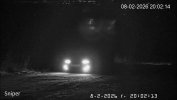
It's a dirt road at the end of a neighbourhood with mostly pedestrian traffic, however cars do come ocassionally - they don't drive fast though like 20-30km/h (12-20mph) at most and they drive towards the camera at a very slight angle. Still night pictures for LPR are very good, here's an example that's like 30 - 35 meters (100-115 feet) away from the camera. It is taken from a screenshot from the video footage and the car had both high beams and foglights on, so extra bright. I have not tested it at night for movement but it seems pretty good with self-adaptive - what I need is to get a closer overview so I can still see something while no cars pass by (which is very rarely especially during night). I do have 2 other cameras that look at that area but they are not that zoomed - one is a standard IPC-T54PRO-AS, the other is a zoomed up IPC-T54PRO-ZE - however it looks through a fence and its zoom is not that close as the Z4E and I don't get much detail at night.

I tested switching profiles in the web configuration - switching from self-adaptive to night profile for the Z4E is almost instant - takes like 1 second if not less. Switching from night to self-adaptive does take some time - like 2-3 seconds as it "adapts" but it's still OK and I don't care about it as long as the self-adaptive -> night is fast (which it is).

They are all but one at stock firmware - what I got them with. I upgraded the firmware of just one IPC-T54PRO-AS to test as it was displaying kind of odd picture (compared to the other cams) - it unlocked some additional functions like AI SSA and AI ISP - after enabling AI ISP picture improved a lot - it gets more blurry with rapid movemend but it is in a position that is covered by other cams and I do enjoy the crisp view of slow movement/static images.
 

Attachments

  • Sniper 2026-02-08 20.02.13.688.jpg
    Sniper 2026-02-08 20.02.13.688.jpg
    576.1 KB · Views: 13
That angle and speed might work - certainly worth a try.

I don't think what you are looking for is available in the camera itself, but since it sounds like you are using BI, the best bet would be to have it call up the API for Night mode when it is triggered within BI.

Unfortunately, we have seen the APIs be inconsistent with the new GUI, so what might work for one camera won't work for another.

Here is the code to make it go into Night Profile with one of the newer GUI cams - it may or may not work. Then need to figure out the API for self-adaptive.

Code:
http://USER:PW@IPADDRESS/cgi-bin/configManager.cgi?action=setConfig&VideoInOptions[].NightOptions.SwitchMode=3&VideoInOptions[].NightOptions.DayNightColor=0
 
  • Exclamation
Reactions: Flintstone61
OK, thanks so much for the help! You got me in the right direction!

Just for the "generations" I'll leave it here how I think I achieved it - will see in the next few days if it works as expected.

The url you gave me works, however it sets it to "Customized Scene -> Night". In order to set it to Day/Night as that was my original intention (although I may have not expressed it correctly) - I used this added to .bat file:

Code:
@echo off

set "CAM_USER=your_username"

set "CAM_PASS=your_password"

set "CAM_IP=your_camip"

curl.exe --get "http://%CAM_USER%:%CAM_PASS%@%CAM_IP%/cgi-bin/configManager.cgi" --data-urlencode "action=setConfig" --data-urlencode "VideoInOptions[0].NightOptions.SwitchMode=1"

timeout /t 30 /nobreak >nul

curl.exe --get "http://%CAM_USER%:%CAM_PASS%@%CAM_IP%/cgi-bin/configManager.cgi" --data-urlencode "action=setConfig" --data-urlencode "VideoInOptions[0].NightOptions.SwitchMode=4"

Switchmode=1 is day/night, Switchmode=4 is self-adaptive. I set up a profile to start from -30 minutes before dawn, and end 30 minutes before dusk. After that I added this .bat file to execute in alerts only for this profile, and when AI detects vehicles.

As I do not currently reside on that property, I cannot test it right now, but if it does not get tested by a random vehicle, I will try to test it in the next few days... and unless I update this - it worked. If there are some issues, I will post an update.

I do not 100% like the above method, as this means that I will be left with 'self-adaptive' mode while I prefer to be left in day/night mode and use self adaptive only for the night.. but I think this can be achieved as well if I set that on profile switch (day profile) to run another curl / .bat file that will switch to (and leave it) in day/night mode, and theeen another one that will switch to self-adaptive when night profile comes.
 
  • Exclamation
Reactions: Flintstone61
The middle camera is a 180degree cam overlooking over the Z4's, of which one is setup like LPR.
At my previous job, we eventually settled on the z12E onsite to run B&W w/IR 24/7/365 to avoid the focus hunting that goes on when switching modes.
I was missing plates in twilight transition on Sunrise and Sunset.
The Z4 is better about that than the z12 was. But if I really watch the z4 it misses plates in morning and evening twilight before it switches to IR. So staying in IR longer stops that, So I'm running it on a schedule in IR until about 1 hour either side of Sunset/sunrise. Then I get a higher %age of plates in a given day.


1779858839221.png