Folks,
BI Version: 6.0.6.9
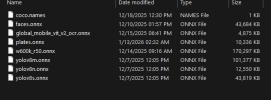
AI In use: DirectML/ONNX
Modesl selected:
- Primary: yolov8m.onnx
- Additional models (selected from list loaded by BI): package,ipcam-dark,ipcam-animal,delivery
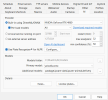
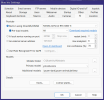
I've moved from using CPAI to using DirectML/ONNX with Yolov8m.onnx. Additionally, in the General settings AI config page, I specify all the additional models that come with the "Pre-load models" download - namely: package,ipcam-dark,ipcam-animal,delivery.
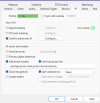
When I setup a camera for AI processing, I'm sending 15 frames - one every 500 MS. All good so far - configuration settings all look normal, but I'm getting a variety of results depending on config.
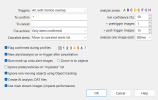
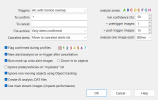
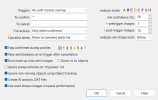
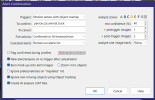
My assumption. If I turn on AI, and in the general BI AI settings, I've included the additional models, and I put * in the "To Confirm" text entry in the Alert Confirmation - I would expect the AI engine to check against the Yolo model as well as the additional models - that doesn't happen. Instead, when I put the .dat file into the AI inspector, I get a single frame being reviewed, then the alert is canceled (I have nothing in the "To Cancel" edit text).
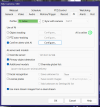
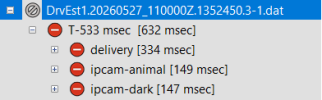
If however, in the Camera's AI dialog, I select "additional models" and provide the additional models, then, in the AI Inspector, I get all frames reviewed using the additional models, but I don't see any review being done by yolov8. Note that I do not have "Override global list" selected.
So, if I don't select Additional models on the AI tab of the camera configuration, I'll get one single frame analyzed and the analysis will then be cancelled (I would have expected that the yolov8m model would ID a person without having the additional models selected).
If I have the additional models, selected, then all 15 frames are analyzed, but it appears that only the additional models are used and the yolov8m model isn't used at all.
I had most everything dialed in with CPAI, until that went south during an upgrade. Now, I'm going with the native solution and I don't have anywhere near enough logging data to tell much of what's going on - all I have is the AI Inspector - and it shows me it's using the additional models, but doesn't seem to use the yolov8 model.
Anyone have any ideas on this? I've certainly learned a ton, but this next step (ensuring the Yolov8 is working) seems to be out of my grasp at the moment.
One final note, I've tried both Yolov8m and Yolov8s. I'm on a system with only 3 cameras (at the moment) and plenty of headroom on the GPU, so I don't believe I'm overloading anything - no errors showing up in log, GPU on the BI Console never goes above 3%, but I can't see if there might be spikes happening and there's no real logging to speak of, so I appear to be stuck.
BI Version: 6.0.6.9
AI In use: DirectML/ONNX
Modesl selected:
- Primary: yolov8m.onnx
- Additional models (selected from list loaded by BI): package,ipcam-dark,ipcam-animal,delivery
I've moved from using CPAI to using DirectML/ONNX with Yolov8m.onnx. Additionally, in the General settings AI config page, I specify all the additional models that come with the "Pre-load models" download - namely: package,ipcam-dark,ipcam-animal,delivery.
When I setup a camera for AI processing, I'm sending 15 frames - one every 500 MS. All good so far - configuration settings all look normal, but I'm getting a variety of results depending on config.
My assumption. If I turn on AI, and in the general BI AI settings, I've included the additional models, and I put * in the "To Confirm" text entry in the Alert Confirmation - I would expect the AI engine to check against the Yolo model as well as the additional models - that doesn't happen. Instead, when I put the .dat file into the AI inspector, I get a single frame being reviewed, then the alert is canceled (I have nothing in the "To Cancel" edit text).
If however, in the Camera's AI dialog, I select "additional models" and provide the additional models, then, in the AI Inspector, I get all frames reviewed using the additional models, but I don't see any review being done by yolov8. Note that I do not have "Override global list" selected.
So, if I don't select Additional models on the AI tab of the camera configuration, I'll get one single frame analyzed and the analysis will then be cancelled (I would have expected that the yolov8m model would ID a person without having the additional models selected).
If I have the additional models, selected, then all 15 frames are analyzed, but it appears that only the additional models are used and the yolov8m model isn't used at all.
I had most everything dialed in with CPAI, until that went south during an upgrade. Now, I'm going with the native solution and I don't have anywhere near enough logging data to tell much of what's going on - all I have is the AI Inspector - and it shows me it's using the additional models, but doesn't seem to use the yolov8 model.
Anyone have any ideas on this? I've certainly learned a ton, but this next step (ensuring the Yolov8 is working) seems to be out of my grasp at the moment.
One final note, I've tried both Yolov8m and Yolov8s. I'm on a system with only 3 cameras (at the moment) and plenty of headroom on the GPU, so I don't believe I'm overloading anything - no errors showing up in log, GPU on the BI Console never goes above 3%, but I can't see if there might be spikes happening and there's no real logging to speak of, so I appear to be stuck.