Combining ONVIF & Motion Sensor & AI

8trek

Getting the hang of it
Dec 19, 2021
88
33
66213
Using built in BI AI. Version = 6.0.5.7

Goal of Driveway cam like most is to detect a vehicle or person. Gave up trying to ignore non-moving objects using object tracking. Any movement would cause the truck parked in the driveway to cause an alert. Now using built in camera tripwire across driveway to detect motor vehicle only along with Zone A with AI to only confirm using person. If I attempt to do this with a cloned camera which only uses ONVIF and the main just uses MS w/AI, this works but with one problem: despite having the cloned camera set to trigger the main camera, it does not do anything as logs say nothing found presumably because the AI only confirms with person. I expected the external trigger sources would not be bound by the AI but guess that’s not how it works. I’d like to have the main camera record when a vehicle enters to avoid having to go to the cloned recordings to see this. If I attempt to do both ONVIF and MS w/AI on same cam with no clone, it never alerts on ONVIF. I’ve experimented with all the various settings, but nothing does what I’m trying to achieve. After months of trial and patience, I’ve run out.
 
Clones served a purpose once upon a time before substreams became a thing as it helped with CPU usage. In my experience, unless you are just recording 24/7 for the clone, too many issues come up with trying to use it for additional triggers or what not.

Since you have a camera with AI (assuming IVS), you can accomplish this within the camera.

Simply create two IVS rules - IVS1 is for vehicle only and IVS2 is for person only.

And then have BI only alert you for IVS2.

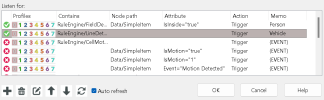
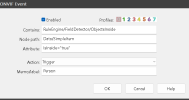
The simple way is to go to the ONVIF and find which one does what and add person or vehicle to the memo

1779554264756.png

1779554201840.png

And then in alerts, tell it to trigger an alert if it contains Person.

You could also re-label IVS1 as vehicle and IVS2 as person and do it that way as well.
 
  • Like
Reactions: chaosengine
I seem to be having good luck using a clone for my PTZ, I have the clone doing AI alerts and the master doing the PTZ movements to preset which are called by the spotters. The only reason for the clone is so I can use "Skip alerts while this preset is active" on the master so the PTZ doesn't get called away while tracking by the spotter and the clone is still able to do confirmed alerts. Only replying because this is a use of alerts with a clone and I was wondering if there was a new better way to do this now. I'm still on V.5, I'll be migrating to V.6 after the black Friday deal, waiting for a better price and hoping all the bugs will be worked out by then. I recently got the PTZ and so far this is the only setting I've found that works for me.
 
Clones served a purpose once upon a time before substreams became a thing as it helped with CPU usage. In my experience, unless you are just recording 24/7 for the clone, too many issues come up with trying to use it for additional triggers or what not.

Since you have a camera with AI (assuming IVS), you can accomplish this within the camera.

Simply create two IVS rules - IVS1 is for vehicle only and IVS2 is for person only.

And then have BI only alert you for IVS2.

The simple way is to go to the ONVIF and find which one does what and add person or vehicle to the memo

View attachment 244037

View attachment 244036

And then in alerts, tell it to trigger an alert if it contains Person.

You could also re-label IVS1 as vehicle and IVS2 as person and do it that way as well.
Thanks for that explanation. I didn't realize you could pass the memo field to AI and assign it to the confirm field using whatever name you want that doesn't have to be in the AI model. So now i have no clone, just using IVF, 1 for vehicle and 1 for person, both are alerting for the most part, although not perfect but better than before. Regarding your comment about substreams and no longer needing clones... not sure i follow as in my experience and based on other posts i've read, the need for clones has to do with trying to do a whole bunch of stuff with one cam can be problematic, by separating duties out to a cloned camera can resolve conflicting alerts.
 
Thanks for that explanation. I didn't realize you could pass the memo field to AI and assign it to the confirm field using whatever name you want that doesn't have to be in the AI model. So now i have no clone, just using IVF, 1 for vehicle and 1 for person, both are alerting for the most part, although not perfect but better than before. Regarding your comment about substreams and no longer needing clones... not sure i follow as in my experience and based on other posts i've read, the need for clones has to do with trying to do a whole bunch of stuff with one cam can be problematic, by separating duties out to a cloned camera can resolve conflicting alerts.

I am sure there is always a use case for clones, but the dependency on them went WAY DOWN when substreams were added. In the past, if you wanted to have two of the same cameras up on the screen, each doing something different as you suggested, having the mainstream feed twice was a CPU hog. Now it is easier to just use bring the camera in a 2nd time.

One area where clones struggle is with using a camera for LPR. I would notice as a clone it would miss the plate because BI processes the main camera first and then the clone. So in rapidly changing field of views, triggers can be missed on clones. And we have seen many here come here with this exact problem of the clone not triggering or triggering late. Most now only use clones for plain 24/7 recording that they send to another drive.

But as you have seen, now with cameras having AI, that also didn't really exist before substreams in BI, you can do a lot with one camera now in BI. I went from running 5 clones, to 4 "mirrors" of a camera (not clone but brought it in twice), to now no clones or double entry of cameras.