
Yes I know Inesun is not “the” brand but I have one and it’s been working great until a few months ago. I opened it up and can not find a factory reset button. It’s a 36z rotating camera, not the dome. Any ideas on resetting? It won’t come online and I can scan the QR and it brings it up but i can not activate it. Ideas for a non geek?
No reset button to be found.
- Thread starter NDHoof
- Start date
You are using an out of date browser. It may not display this or other websites correctly.
You should upgrade or use an alternative browser.
You should upgrade or use an alternative browser.
SpacemanSpiff
Known around here
How is it powered? Via its own supply or from a PoE switch?
Listen closely, any noises (whirr, or click) from it in the first 90 seconds or so?
Power it up in a dark room... do the IR illuminators come on during the first 90 seconds?
Any light activity on the Ethernet port it is connected to (if the ports have lights)?
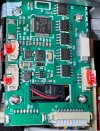
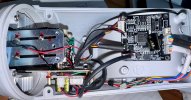
consider posting some pix of the circuit board(s).
Welcome to IPCT
Listen closely, any noises (whirr, or click) from it in the first 90 seconds or so?
Power it up in a dark room... do the IR illuminators come on during the first 90 seconds?
Any light activity on the Ethernet port it is connected to (if the ports have lights)?
consider posting some pix of the circuit board(s).
Welcome to IPCT

Thank you I will take pics and post. The camera runs through its cycle ok it just won’t come online on the app (deleted and reinstalled app and camera multiple times). It just insists that it’s offline. It’s wired with a lan cable and 12vdc power pigtail. I’ll have to pull it all apart for gut pics. I’ve been using the HiSee app for this camera and am searching on here for an app that may allow me to view different brands on one app. I have accumulated Boavision, Inesun and one other brand. I did try Blue Iris a few years ago but could not get them all to connect. I don’t record or anything, just check the yard and barns when away from home. App shows camera but it should be green and active…How is it powered? Via its own supply or from a PoE switch?
Listen closely, any noises (whirr, or click) from it in the first 90 seconds or so?
Power it up in a dark room... do the IR illuminators come on during the first 90 seconds?
Any light activity on the Ethernet port it is connected to (if the ports have lights)?
consider posting some pix of the circuit board(s).
Welcome to IPCT
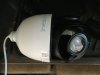
Attachments

Last edited:
SpacemanSpiff
Known around here
When the cam is connected, can you review the DHCP clients in your router settings? The hope is that you see the IP address lease assigned to the camera. You can then try typing the IP address into a web browser, and see if anything comes up in the browser
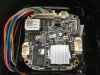


Ah ha! I jumped those two and wal-la the sucker is working! Spaceman Spiff THANK YOU SO MUCH FOR YOUR TIME and answering. I really do appreciate it. The world needs more mentors. Now to continue my search for a universal viewing app.

alastairstevenson
Staff member
Hmm.. a bit odd as it's labelled LED and has polarity indicators.I jumped those two and wal-la the sucker is working!
And it's a power supply board, not the controller board.

Sunny Matthew
n3wb
UPDATE 16:50 CST 02.02.2026 -- The camera is UP and functioning!
To whom it may concern,
I have a Brand: INESUN Model: INS-HD345TAE PoE camera.
The unit loads and I can ping it, however I do not have the software to connect,
and do not recall the password.
I believe the default USERNAME is: admin and the PASSWORD is: 123456
If someone else familiar with the INESUN brand, knows, kindly chime in.
I do not see a reset button on the inside nor anywhere on the PTZ housing.
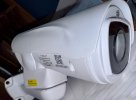
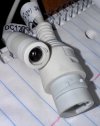
Would anyone know where I can reset the device on the unit itself? (See attached images)
I thank you in advance for your time and assistance with my issue and concern.
Regards,
Matthew
BTW - For those wondering what I am going to be doing with this camera. I am planning on strapping it to the chimney, facing West, to monitor the weather that comes in. I'd say it's a good enough camera for this.
Tagging >>> @SpacemanSpiff
I used "ALIBI CONFIG TOOL", which saw the camera.
Clicked on RESET PASSWORD and then typed in 123456 when prompted.
Received a prompt stating the Password was reset successfully, and I was able to log into the camera.
For anyone who see this and has a similar issue with a INESUN branded camera, you might want to try this for yourself.
To whom it may concern,
I have a Brand: INESUN Model: INS-HD345TAE PoE camera.
The unit loads and I can ping it, however I do not have the software to connect,
and do not recall the password.
I believe the default USERNAME is: admin and the PASSWORD is: 123456
If someone else familiar with the INESUN brand, knows, kindly chime in.
I do not see a reset button on the inside nor anywhere on the PTZ housing.
Would anyone know where I can reset the device on the unit itself? (See attached images)
I thank you in advance for your time and assistance with my issue and concern.
Regards,
Matthew
BTW - For those wondering what I am going to be doing with this camera. I am planning on strapping it to the chimney, facing West, to monitor the weather that comes in. I'd say it's a good enough camera for this.
Tagging >>> @SpacemanSpiff
Attachments
-
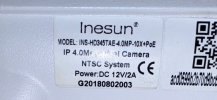 IMG_5215.jpeg349.1 KB · Views: 7
 -
 IMG_5205.jpeg1.3 MB · Views: 17
 -
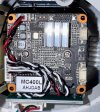 IMG_5207.jpeg1.3 MB · Views: 7
 -
 IMG_5208.jpeg1.9 MB · Views: 11
 -
 IMG_5206.jpeg1.4 MB · Views: 7
 -
 IMG_5209.jpeg1.7 MB · Views: 5
 -
 IMG_5210.jpeg1.5 MB · Views: 5
 -
 IMG_5211.jpeg1.6 MB · Views: 5
 -
 IMG_5213.jpeg1 MB · Views: 5
 -
 IMG_5214.jpeg558.6 KB · Views: 5
Last edited:
SpacemanSpiff
Known around here
Sunny Matthew
n3wb
Cool! Thank You, much appreciated.I-net searchsayssuggests the default password maybe: admin / 12345 or admin / admin

I wonder if it's sitting at a HIKvision default Ip address waiting for initialization?
Last edited:
Sunny Matthew
n3wb
The address I assigned to this board back in 2017 was 10.0.1.15 and I do not recall the password.I wonder if it's sitting at a HIKvision default Ip address waiting for initialization?
I can see the camera on my network, I am going to try iVMS (HikVision) and see if I can reset the dang thing that way.
Sunny Matthew
n3wb
I wonder if it's sitting at a HIKvision default Ip address waiting for initialization?
UPDATE 16:50 CST 02.02.2026 -- The camera is UP and functioning!
I used "ALIBI CONFIG TOOL", which saw the camera.
Clicked on RESET PASSWORD and then typed in 123456 when prompted.
Received a prompt stating the Password was reset successfully, and I was able to log into the camera.
For anyone who see this and has a similar issue with a INESUN branded camera, you might want to try this for yourself.